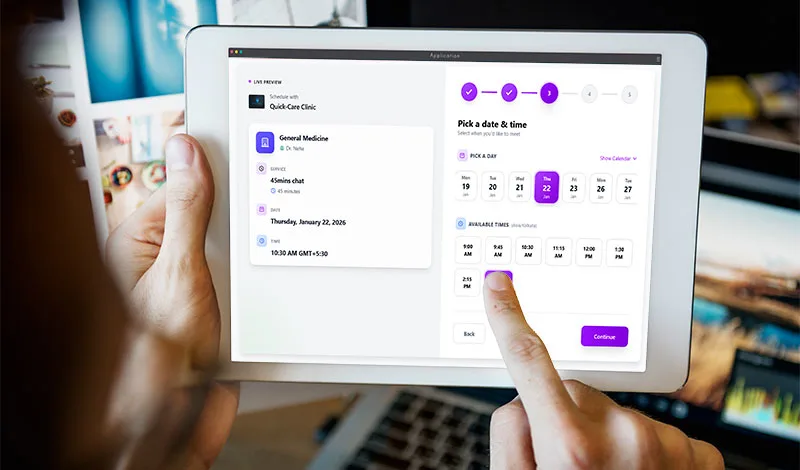
Rather than investing too much money in unnecessary digitalization of your clinic, a doctor-booking system can help organize the day without manual effort.
That one will not only be cheaper but also worth it for solo practitioner doctors. Especially those who are running the clinic with limited staff and growing?
This guide is for doctors who are looking for an online booking system. Choose the best after reviewing the technology, workflow, price, and features.
By the end, you'll feel confident exploring options. Let's dive in!
What Is Appointment Booking Software for A Doctor?
Healthcare is a very responsive profession. Doctors have their own requirements for patient care: regular examinations, emergency care, and follow-up. Beyond that, managing and scheduling appointments manually creates challenges, including long queues and double-booking. Missed booking calls go unaccounted for, and no-shows are untraceable, directly impacting revenue.
A doctor appointment scheduling software that is specifically built to meet doctors' requirements. Whether they are a solo practitioner or run a small clinic, they can allow patients to book time slots online and automatically schedule appointments based on set rules.
A centralized calendar not only prevents double-booking but also updates when bookings are rescheduled or canceled.
The result is no missed bookings, minimal no-shows, and no long waiting queues. Means a better resource management for real growth.
Beginners start with free trials—no tech skills needed.
Key parts include:
- Patient portal: Easy slot picker.
- Doctor dashboard: View and manage bookings.
- Notifications: SMS or email alerts.
Why do doctors need an automated booking system?
Without an organized booking system, we see a long queue for a few hours, and resources and staff sit idle for the rest of the day.
Time Sevvy for everyone. Patients skip long waiting calls. Doctors cut no-shows by 40% with reminders—and with this schedule, they could manage their time more efficiently.
Easy accessibility - Patients can book from home to visit the clinic in person or for online wellness consultations (e.g., yoga therapy sessions, diet plans). Online booking shines for job-oriented people, making it easy to book a slot that fits their schedule.
Analyze and handle growth: Small clinics scale up. They can manage the schedule effectively by analyzing previous booking records to better utilize available free slots.
Reassures beginners: No upfront costs, even free for the first few months to set up and adapt to the existing working environment. Then, you pay only for what you and your team need, based on the number of clients and the features you choose (app integrations, online payments, cloud storage, branding, etc.).
How It Works: Simple Step-by-Step
No worries, simple process. Here's how it will fit into your daily routine.
Step 1: Doctor Sets It Up
You pick a tool or app (GetSetTime). To create the workspace, you need to sign up via email id(official or general), with other details: personal name, clinic name, address, specialty like "general check-up", "ortho", or "diabetes consult." Link your phone and calendar. It all takes almost 15 minutes.
Step 2: Patient Books Online
A patient searches for the clinic on Google using search terms such as "Dr. Singh clinic Mohali" or "(specialty service) near me". They find and click on the booking link (shared on GBP, website, and social media). They view available slots for the visiting day, select a suitable one, enter the details, and pay online if needed. Done:
Step 3: System Manages Automatically
The app blocks that slot and notifies the doctor or receptionist with a chosen template, such as "Mr. booked 10 A.M." Also, it auto-syncs with your phone calendar and sends reminders to the patient as set, e.g., 4 Hours before the visit time.
Step 4: During and After the Visit
Check in via the clinic's QR code and find records of previous visits and payments. Post-visit, patients rate you. You reschedule if needed—one click.
Also, records and reports help to customize your schedule and utilize the resource efficiently during peak times.
Who Should Use It?
This system fits various professionals. Start if you match these.
Busy Urban Doctors
Managing a high =-number of patients manually or with offline software is not only costly but also overwhelming. One Online appointment booking system minimizes workload through automation, bringing convenience and efficiency.
Small Clinic Owners
Low staff? No problem—the system acts as your assistant. Handles 100 bookings/week easily.
Wellness and Specialty Pros
Nutritionists in Bangalore or physiotherapists in Chennai. Group sessions or follow-ups shine here. Recurring slots auto-fill.
Multi-Location Practices
Doctors who practice at multiple locations at different times on the same day or on a different day. They can customize their schedule and allow bookings.
Extra Tips for Beginners in India
- Choose local-friendly apps, like GetSetTime, that offer UPI payments, support for regional languages for SMS & communications, and invoicing.
- Integrate: link with Meta and WhatsApp Business for sharing.
- Secure data: Look for compliance with Indian standards (e.g., NDHM).
- Start small: one service at a time, then add.
| Feature | Manual Booking | Online System |
|---|---|---|
| Time per booking | 5-10 mins | 30 seconds |
| No-show rate | High | Cuts by 40% |
| Cost | Free but lost revenue | ₹999-2999/month |
| Patient reach | Local calls | Nationwide |
Wrapping Up: You should try!
You've got the basics! How an online appointment booking system simplifies a doctor's daily routine and scales up. When patients can book appointments easily, you can focus on care. It's too friendly—on both the doctor's side and the clients'.
Schedule Your Appointments Smartly with Clients Without Human Interruptions
Basics of Scheduling Software: What It Is, How It Works and Who Can Use
Frequently Asked Questions
A designed platform to manage the routine tasks such as booking, rescheduling, and confirmation of patient visits in automation mode. Enabling 24/7 access for patients to schedule appointments, typically through a website or app.
With automation, this system not only eliminates the booking errors by manual entry but also optimizes staff availability, minimizes waiting room crowding, and improves efficiency. Its user-friendliness and self-service booking enhance the patient experience.